
에러 탈출 일지
select Test01 본문
select Test01
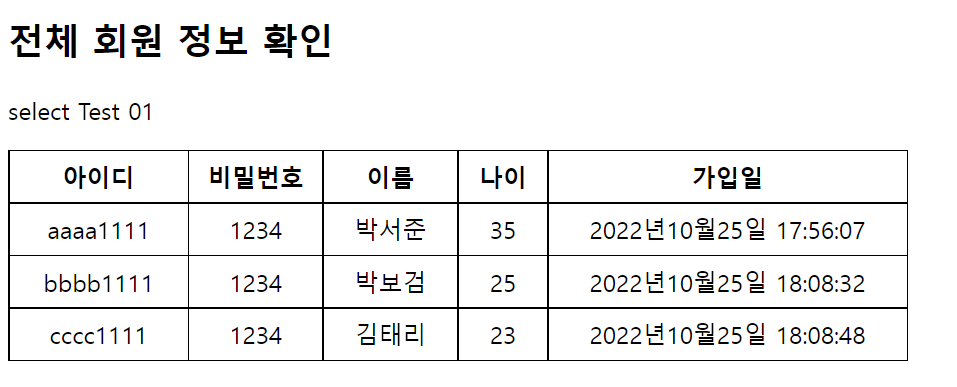
<body>
	<h2>전체 회원 정보 확인</h2>
	<p>select Test 01</p>

	<%
	// 날짜 포맷
	SimpleDateFormat sdf = new SimpleDateFormat("yyyy년MM월dd일 HH:mm:ss");

	// DB 접속 정보 - url, 계정명, 계정비밀번호
	String url ="jdbc:mysql://localhost:3306/test01?useSSL=false";
	String dbId = "aws01";
	String dbPwd = "1234";


	// JDBC 객체 - 연결, 질의,
	Connection conn = null;
	PreparedStatement pstmt = null; // DB에 질의하는 객체
	ResultSet rs = null;            // 질의 결과를 테이블 형태로 받는 객체

	// SQL문 - select문
	String sql = "select * from member";

	try{
		// 1단계 - 드라이버 연결
		Class.forName("com.mysql.jdbc.Driver");
		// 2단계 - DB 접속
		conn = DriverManager.getConnection(url, dbId, dbPwd);
		// 3단계 - 질의 객체 생성
		pstmt = conn.prepareStatement(sql);
		// 4단계 - sql문 실행 -> 결과를 받음
		rs = pstmt.executeQuery();

		out.print("<table>"); // 테이블 형태로 만들기
		out.print("<tr><th>아이디</th><th>비밀번호</th><th>이름</th><th>나이</th><th>가입일</th></tr>");

		while(rs.next()){
			String id = rs.getString("id");
			String pwd = rs.getString("pwd");
			String name = rs.getString("name");
			int age = rs.getInt("age");
			Timestamp regDate = rs.getTimestamp("regDate");

			out.print("<tr>");
			out.print("<td width='20%'>"+ id +"</td>");
			out.print("<td width='15%'>"+ pwd +"</td>");
			out.print("<td width='15%'>"+ name +"</td>");
			out.print("<td width='10%'>"+ age +"</td>");
			out.print("<td width='40%'>"+ sdf.format(regDate) +"</td>");
			out.print("</tr>");
		}
		out.print("</table>");
	}catch(Exception e){
		e.printStackTrace();
		out.print("데이터 조회시에 예외가 발생하였습니다.");
	}finally {
		// 역순으로 닫아주기
		if(rs !=null) { try {rs.close();} catch(Exception e) {e.printStackTrace();} }

		if(pstmt != null) { try{pstmt.close();} catch(Exception e) {e.printStackTrace();} }
		if(conn != null) { try{conn.close();} catch(Exception e) {e.printStackTrace();} }
	}
	%>


</body>
select test Form - 문제) 사원의 정보 아이디 또는 이름을 통해 조회하고, 비밀전호를 확인하여 처리 페이지에서 표 형태로 출력하도록 하시오
<style>
#container {
width: 500px;
margin: 0 auto;
}
h2 {
text-align: center;
}
#deleteForm {
border: 1px solid black;
padding: 10px;
}
.d_input {
width: 100%;
margin: 10px;
padding: 10px;
}
.d_input label {
display: inline-block;
width: 100px;
margin-left: 60px;
font-size: 1.1em;
font-weight: bold;
}
.d_input input[type="text"] {
margin-left: 20px;
height: 23px;
}
.d_btns {
text-align: center;
margin-top: 30px 0 10px;
}
.d_btns input {
width: 100px;
height: 30px;
background-color: black;
color: white;
font-size: 0.9em;
font-weight: bold;
}
</style>
<script>
document.addEventListener("DOMContentLoaded", function() {
let btnDelete = document.getElementById("btnDelete");
btnDelete.addEventListener("click", function() {
let form = document.deleteForm;
if (!form.id.value) {
alert("아이디를 입력하시오.");
form.id.focus();
return;
}
if (!form.pwd.value) {
alert("비밀번호를 입력하시오.");
form.pwd.focus();
return;
}
form.submit();
})
})
</script>
</head>
<body>
<div id="container">
<h2>회원 조회 폼 페이지(1명)</h2>
<form action="selectTest02Pro.jsp" method="post" name="selectForm" id="selectForm">
<div class="d_input">
<label for="id">아이디</label><input type="text" id="id" name="id">
</div>
<div class="d_input">
<label for="pwd">비밀번호</label><input type="text" id="pwd" name="pwd">
</div>
<div class="d_btns">
<input type="button" value="입력완료" id="btnDelete">  
<input type="reset" value="삭제">
</div>
</form>
</div>
</body>
'개발 > JavaScript' 카테고리의 다른 글
| Delete Test 01 (0) | 2022.10.25 |
|---|---|
| [Javacript] jQuery (0) | 2022.09.28 |
| [JavaScript] 키(Key) 이벤트 (0) | 2022.09.26 |
| [JavaScript] DOM 요소의 추가 (document 객체) (0) | 2022.09.21 |
| [JavaScript] BOM 객체 (location, history) (0) | 2022.09.20 |
'개발/JavaScript' Related Articles
more


